


Military Retirement
4.7298.00 Reviews
App Specs
- Version
- 2026.7
- Updated On
- License
- $5.99
- Downloads
- 10,000+
- Developer
- LYNNFIELD LLC
- Categories
- Finance
- Platform
- Android, iOS
Screenshots
 Analysis by AppCompare
When I look at a military retirement estimate, the useful question isn’t just “What might the number be?” It’s “What assumptions produced it, and how much would the answer change if my plans changed?” That is the practical value I look for in a military retirement calculator. Military Retirement, a paid finance app from LYNNFIELD LLC, is built around estimating retirement pay, giving service members a way to explore that question before a major career or household decision is set in stone.
I’d treat it as a planning aid rather than an official determination of what I’ll receive. Its strongest role is helping me think through scenarios and identify what I need to verify. That distinction matters: a convenient estimate can make a conversation with a qualified benefits office more focused, but it should not be the final word on a consequential financial choice.
The useful idea: turn service details into an estimate
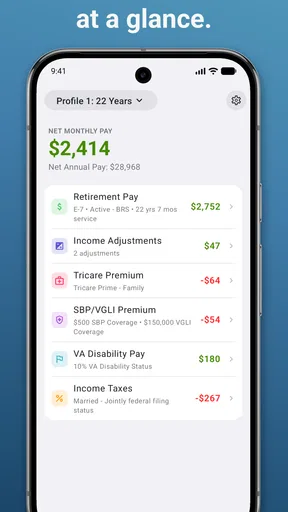
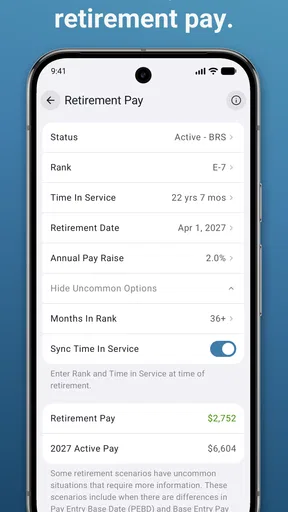
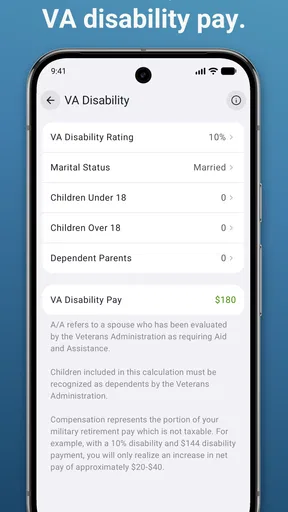
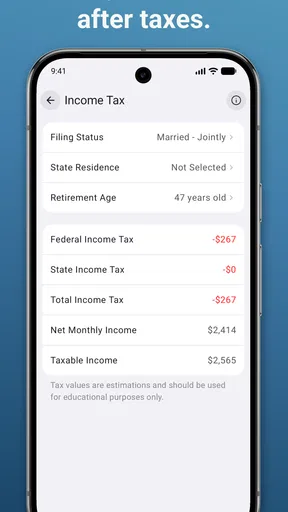
The central capability is straightforward: enter service information and use it to estimate military retirement pay. That can make an unfamiliar subject easier to approach, especially if I’m trying to understand how career timing may affect the outcome. Instead of beginning with a stack of rules and documents, I can start with a working estimate and then ask more specific questions.
The app is categorized as finance, and that feels right. It is aimed at a particular financial planning problem, not at managing every part of a household budget. I would not expect it to replace a full budgeting app, provide a complete retirement portfolio plan, or resolve every individual eligibility question. Its value is narrower: bringing an estimate of military retirement pay into reach.
How I’d use the estimate without overtrusting it
I’d begin by gathering the service details I already know, then enter them carefully and take note of the assumptions behind the result. If I’m unsure whether a detail is recorded correctly, I would check my own official paperwork rather than guess just to get a number on screen. Small input errors can make a result look more certain than it really is.
After getting a baseline, I’d change one assumption at a time. For example, I could compare the estimate I get from my current plan with a scenario in which I serve longer. Keeping the other inputs steady makes the comparison easier to understand; changing several things at once may produce a different number, but it won’t tell me which change mattered. I’d save or write down the assumptions alongside any result I want to discuss later.
This is also where I’d be careful about treating an estimate as a promise. Military retirement rules and a person’s record can be nuanced, and an app calculation cannot make an incorrect service record correct. I’d use the output to prepare questions, then confirm important details with an appropriate official resource before making a decision that affects my family’s finances or career.
Worth Reading Before You Choose

Flipboard Shows What News Apps Must Do Beyond the Feed

Switching to Android Auto Means Rethinking Your Driving Routine

Google Calendar Makes a Crowded Week Easier to Manage

Ludo King Makes the Most of the Minutes Between Plans

Baby Panda World Brings Quick Play to Modern Phones, but Its Game Library Feels Busy

ESPN’s Live Game View Makes Following Close Games Easier
A realistic moment when it can help
Imagine I’m weighing whether to stay in for another stretch of service. At home, we’re also trying to decide whether to move, adjust savings, or make another long-term commitment. I could use Military Retirement to get a working estimate based on my current information, then compare it with a carefully changed scenario. That would not answer every part of the decision, but it could help us see what we should ask next and whether our expectations need a closer look.
The practical benefit is not that a calculator chooses a career path for me. It is that I can bring a more concrete starting point to a conversation with a spouse, financial professional, or benefits adviser. I’d keep the discussion grounded by explaining that the figure is an estimate and showing the assumptions I used rather than presenting one result as guaranteed income.
Where it fits—and where another resource is better
Compared with a general retirement calculator, a military-focused tool has a more relevant starting point for someone thinking about service-related retirement pay. A broad calculator may be useful for combining savings, investments, and other income into a wider household picture, but it may not be designed around a military career. On the other hand, an official benefits resource is the better place to verify eligibility and rules, while a financial adviser can help connect an estimate to taxes, spending, and the rest of a retirement plan.
I’d use those resources together rather than ask one tool to do everything. A sensible workflow is to use the app to explore a question, confirm the service facts through authoritative records, and then use a broader planning method for the household decision. That division of labor is especially helpful when the estimate seems surprising: first check the inputs, then verify the applicable rules, and only then decide whether the result changes the plan.
One useful habit is to label each scenario with a plain-language note such as “current plan” or “considering longer service,” along with the date I ran it. That makes comparisons more meaningful when I revisit them later and helps prevent an old estimate from being mistaken for a current one. I’d also avoid sharing a screen or written result without checking whether it contains personal service details I’d rather keep private.
Getting Started with Military Retirement
First off, downloading the app was a breeze. It’s available on both Android and iOS, which is super convenient. Once you fire it up, you’re greeted with a clean, straightforward interface. No frills, no fuss—just the way I like it.
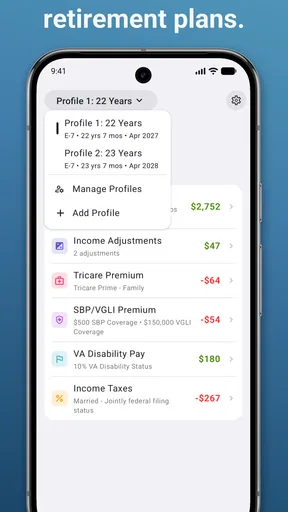
The app is designed to help military personnel track their retirement benefits, and honestly, it does a pretty solid job. The setup process is intuitive. You input your service details, and the app does the heavy lifting from there.
User Interface and Experience
The user interface is where Military Retirement really shines. Everything is laid out logically, making navigation a breeze. You don’t need to be tech-savvy to figure things out, which is a massive plus.
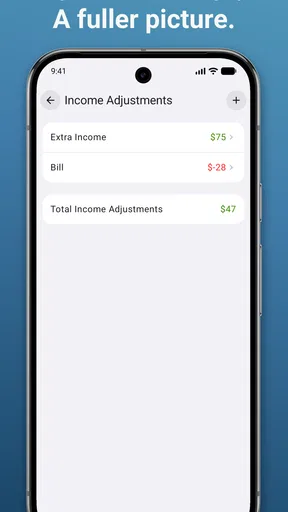
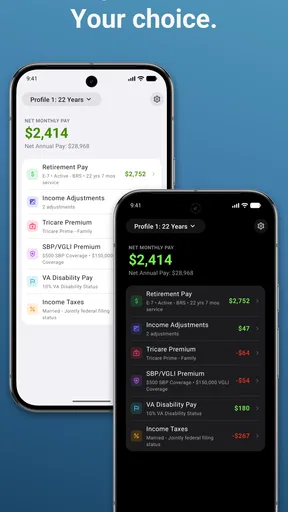
One feature I found particularly handy is the dashboard. It gives you a quick overview of your retirement status, including your estimated pension and other benefits. The data is presented clearly, with no clutter to distract you.
Features Worth Highlighting
Now, let’s talk features. The app offers a bunch of tools to help you manage your retirement planning effectively. Here are a few standouts:
- Benefit Calculator: This is a lifesaver. It lets you calculate your estimated retirement benefits based on your service history. You can tweak variables like retirement age and years of service to see different scenarios.
- Retirement Timeline: A visual timeline that helps you track important milestones in your military career. This is perfect for keeping tabs on when you’re eligible for certain benefits.
- Custom Alerts: You can set up alerts for important deadlines and events, ensuring you never miss a beat.
These features make the app not just a tool, but a companion in your retirement planning journey.
Practical Applications
Using the app daily, I noticed how it seamlessly integrates into a regular routine. Whether you’re actively planning for retirement or just want to keep an eye on your benefits, it fits the bill.
For those at the beginning of their career, it provides insights into long-term planning. And for those nearing retirement, it offers clarity and peace of mind about what to expect.
The app also encourages regular check-ins, which is a great habit for anyone managing their financial future. It’s like having a personal retirement advisor in your pocket.
Cost, audience, and expectations
Military Retirement costs $5.99, so I’d think about whether I’m likely to use a dedicated calculator more than once before buying it. For someone comparing career scenarios or preparing for retirement discussions, a focused tool can be worth paying for; someone who only needs a one-time rough figure may prefer to begin with free official resources and decide afterward whether an app adds enough convenience.
The app is rated for Everyone, runs on Android version 4.1 or later, and its current version is 2025.3. It has a 4.7 average from around 860 ratings and more than 10,000 installs. Those figures suggest it has found an audience, but they don’t tell me whether its assumptions match my individual situation, so I’d still check the calculation carefully.
I’d recommend it most to active service members who want a practical way to explore retirement-pay scenarios, and to family members helping organize questions for a planning conversation. It is less suitable for someone seeking an authoritative benefit ruling, a complete household financial plan, or a tool that replaces careful review of service records. In those cases, an official source or a qualified professional is the better next step.
Final Thoughts
In wrapping up, Military Retirement is a must-have for anyone in the armed forces. It’s user-friendly, packed with useful features, and genuinely makes retirement planning less of a chore.
While it’s primarily aimed at military personnel, I can see its appeal extending to family members or anyone involved in military finance planning. It’s a versatile tool that does its job well.
So, if you’re looking for a reliable app to help navigate the intricacies of military retirement, do yourself a favor and give this one a shot. You might just find it becomes an indispensable part of your financial toolkit.
Pros
- Comprehensive retirement planning tools
- User-friendly interface for easy navigation
- Regular updates with new features
- Secure data encryption for privacy
- Supports multiple military branches
Cons
- Limited customer support options
- Requires internet connection for most features
- Occasional bugs in the latest version
- No offline access to key resources
- Ads can be intrusive on free version
FAQs for Military Retirement
What is the primary function of the Military Retirement app?
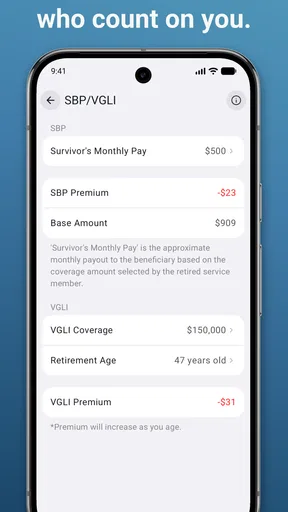
The Military Retirement app is designed to help military personnel plan their retirement with ease. It provides tools to calculate retirement pay, access benefits information, and manage personal finances. The app aims to simplify the complex process of planning for retirement, ensuring users have all the necessary resources at their fingertips.
Is the Military Retirement app available for both Android and iOS devices?
Yes, the Military Retirement app is available for download on both Android and iOS platforms. Users can access the app through the Google Play Store for Android devices and the Apple App Store for iOS devices, ensuring wide accessibility for all military personnel regardless of their preferred device.
Does the app offer personalized retirement planning features?
The Military Retirement app provides personalized planning features tailored to individual users. By inputting specific service details and personal information, the app generates customized retirement pay estimates and benefit projections. This personalized approach assists users in making informed decisions about their retirement future.
Are there any costs associated with using the Military Retirement app?
The basic version of the Military Retirement app is free to download and use. However, there may be premium features available for purchase within the app. These features could include advanced financial tools or personalized consultations, offering additional support for those seeking more detailed retirement planning.
How secure is my personal information within the app?
The Military Retirement app prioritizes user security by implementing robust encryption and data protection measures. All personal information entered into the app is securely stored and transmitted. Regular updates ensure compliance with the latest security standards, providing users with peace of mind when managing sensitive information.


